One Pi, Four Machines, Zero Trust
Ah, the humble homelab. Creator of ideas. Destroyer of dreams. I’ve written about my homelab setup before, but the honest truth is that I just keep neglecting post-build maintenance. So Asimov eventually fell off the radar.
But yesterday I made it my mission to dust off that old Raspberry Pi, clean up my docker environment, and get the homelab back online. Why? Because I’m SICK of ads.
I’d been wanting to set up a Pi-hole for ages; I’ve known about the software for years. About a week ago it really hit me (in the middle of Hell’s Kitchen S12) just how many dang ads I had to watch just to get through one episode of my favorite reality tv show. What a waste of time!
So yeah. We have the hardware. We have the courage. Why not just give it a shot and get the Pi-hole going? Turns out it’s actually even easier to do than I expected; the Pi-hole was up and running within 15 minutes. What wasn’t as easy was dealing with DHCP reservations and DNS configuration: one small mistake there and my home network was down for about an hour. But that’s okay! We live and learn.
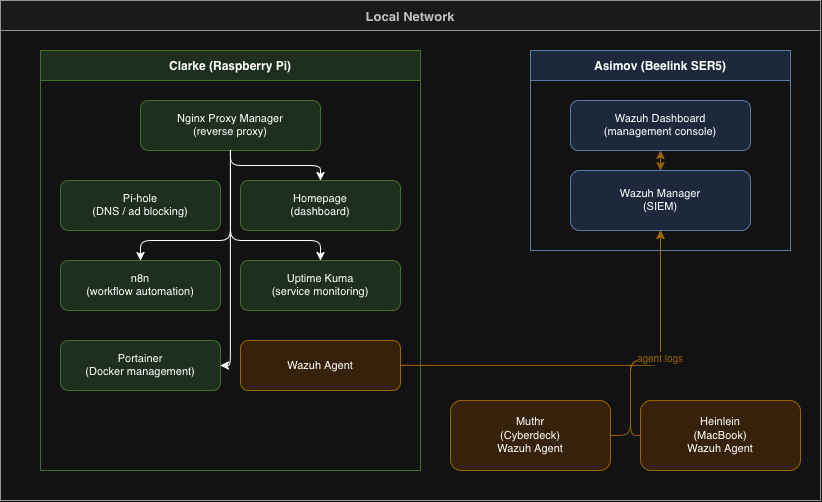
To keep up with my sci-fi naming convention, I made the Pi’s hostname ‘Clarke’. My always-on Windows machine is still ‘Asimov’, while my MacBook I renamed ‘Heinlein’. The colloquial ‘big three’. I also have my cyberdeck which remains ‘Muthr’, but I would like to get a ‘Le Guin’ represented eventually – will just need to think of where that might fit in the stack.
Anyways, Clarke was live with a Docker install of Pi-hole, which was great. But like all great things, it was soon driven to excess. I decided to fly even closer to the sun – I stood up containers for n8n, Uptime Kuma, Portainer, Homepage, and even an NPM reverse proxy in front of all of it. I laughed maniacally as my open-sourced services grew and my obligations to expensive paid providers shrank.
But then I slowed down and started to think about security. In the past I’d never really considered security beyond the basics (I dunno, change your passwords every few years?). But working on the Google Cybersecurity Certificate has opened me up to a whole realm of frameworks and controls that I’d like to get more hands-on experience in.
And what could be more hands-on than a personal SIEM? So I got to work on a Wazuh deployment.
Now this is where things got a little tricky. Wazuh is really exciting but not well-suited for running on Clarke. It needs a fair chunk of memory. Luckily, Asimov was still sitting pretty on 64Gb of DDR4 (sending so much gratitude to 2023 Carter for going all-out on that upgrade). So Asimov is the perfect candidate for my homegrown Security Operations Center. And once the Wazuh manager/dashboard was setup, agent deployment to the other devices was a breeze!
So now we’ve got Wazuh deployed across my little fleet: monitoring agents on Asimov, Clarke, Heinlein, and Muthr. One vulnerability scan and we learn pretty quickly that… well… CVE’s are everywhere and we’ve got a bit of work to do. But that’s okay! Hardening my endpoints is the next step, and good experience to gain.
Beyond that, the roadmap is taking shape. I do want to get another Cloudflare tunnel (after we do the aforementioned hardening). With all these services, an SSO is starting to sound enticing. Or maybe Tailscale as a simpler authentication option.
Ultimately, this was a really fun Monday. It feels so good to have the homelab up and running, and it’s actually got some real practical uses this time around. I’ve already configured n8n for some automated workflows, and Wazuh is giving me invaluable information on my security posture. Most of all though, running through this build gave me some actual experience on deployments, tooling, and maintaining infrastructure. As great as the Google course is, it doesn’t really have much in that vein.
We’ll keep the homelab going of course – and this time I won’t be letting the dust collect. Keep an eye out for future posts on this one.
-Carter